Reserved words in a language are words that have very special meaning to the language. If python sees any of it’s preserved words, it have only one and only one meaning to it.
The words you will make by yourself as a programmer will be called variables. The words you create by yourself should never consists of any of the reserved words.
Reserved words in python includes
and
and is a logical operator that matches the boolean logic AND that returns true if and only if two operands are true and false otherwise.
as
It is used to define a certain word with a different name which is usually referred as alias. It allow user to define a friendly name in programing activities. For example, consider an programmer that want to import a file called matplotlibray which will be used most of the time in a program.
We can us the as to rename the file mat as as in:
import matplotlibray as mat
now we can be use mat instead of the word matplotlibray
assert
used in debugging where it allows one to test the correctness of a code by checking if some specific conditions remains true.
Until there is a bug in the program, the assertion remains true. for example the statement assert number > 0 tests a condition where a number must be greater than 0 and if not, a debugger throws an AssertionError.
break
It allows you to exit a loop when an external condition is met and allows the program to resume the next statement after the loop.
it terminates the loop that contains it and directs the program to flow to the statement that follows the block.
It is used in for loops and while loops.
For example:
for x in numbers:
    if x =5:
       break
continue
It makes the code skip the current iteration and proceed to the next one
It is useful where we need to skip part of the loop but remain in the same loop block.
Continue skip the statements in the current iteration of the loop and moves the control back to the top of the loop.
For example:
for number in range(30,50):
    if number % 2 ==0:
        continue
    print(number)
In the above code, the if statement checks if the number is divisible by 2 and if it evaluates true, it skips to the next number which is odd. Hence the program print odd numbers between 30 and 50 as shown.

class
used to create a python class. class is a template for objects. Creating a new class creates a new type of object, allowing new instances of that type to be made.
An object is a collection of variables and methods which acts as a blue print for that object.
we use class to create a class in Python. for example
class Student:
    name = " "
    DOB= ""
    EnrollmentDate = ""
    Grade = " "
The code snippet above shows a student class being created.
An object of class student can be created from class as shown:
James = student()def
it is used to define a function in python. Every code you put between the def function name and it’s end with be considered as a single logical piece of code with statements that can be executed at once by invoking the name of the function.
The following code defines a function called grade that calculates student grade based on marks passed to it:
def grade(marks):
    grade = " "
    if marks >100 or marks < 0:
        grade = "invalid"
    if marks >=80:
        grade = "A"
    elif marks >=60:
        grade = "B"
    elif marks >=40:
        grade = "C"
    elif marks >=20:
        grade = "D"
    else:
        grade = "fail"
    return grade
We can call the function and provide pass some marks to it as an argument as shown below:
marks = 65
print(grade(marks))
del
used to delete object in python. It’s primary goal is to destroy objects in python code. When del is used against an object , the object is removed from the scope of the object.
consider the student class we created earlier..
class Student:
    name = "James bond"
    DOB= "19/01/1999"
    EnrollmentDate = "23/01/2020"
    Grade = "B+"
James = Student()
print(James)
When run, the program gives the following output:

supposed now we delete the object student as in code below:
class Student:

    name = "James bond"
    DOB= "19/01/1999"
    EnrollmentDate = "23/01/2020"
    Grade = "B+"
James = Student()
print(James)
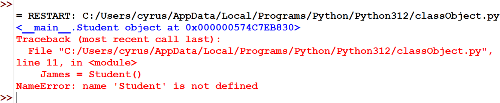
del Student
James = Student()

print(James)
running the code will cause an exception error that shows missing of an object student as shown
The del keyword can also be used to delete objects like dictionaries, items in a list, tuples and even user-defined objects.
elif
Used to include multiple conditional expressions after the if condition or between the if and else conditions.
marks = int(input("marks: "))

grade="no marks"

if marks <=20:

    grade="fail"

elif marks <=40:

    grade = "D"

elif marks <=60:

    grade = "C"

elif marks<80:

    grade ="B"

elif marks <=100:

    grade = "A"

else:

    grade = "Invalid!"

print(grade)
else
It is used in conditional statements like if statements and is used to decide what to do if a condition is false.
x =30
if x % 2 ==0:
  print(i, "divisible by 2"
else:
  print(i, "not divisible by 2")
try
It is used in try-except block and it defines a block of code that is tested for errors, if nor errors is detected, the code in try block is executed, otherwise it is passed to the except block. Different error types can be defined in the except block.
def quotient(a,b):

    try:

        quot = a / b

        print(a, "divided by", b, "is", quot)

    except ZeroDivisionError:

        print("Division by zero is not allowed in this system")

    except TypeError:

        print("the division values not acceptable")

    finally:

        # This code will always be executed

        print("we could be having infinity as the answer but we have modified the denominator")

        b = b+1

        ourQuout = a//b

        print("Maybe you could like our suggested answer:;",ourQuout)
except
used in try-except block and defines a block of code that should run if the try block raises an error. Except pairs with try where try block is executed where there is no exception error but when there is an error that prevents that block to execute, the control is transferred to except block.
def quotient(a,b):

    try:

        quot = a / b

        print(a, "divided by", b, "is", quot)

    except zeroDivisionError:

        print("Division by zero is not allowed in this system")


quotient(32,5)
finally
it defines a block which will always be executed after leaving a try-except statement if some exception was not handled by the except block. It helps in deallocating the system resources.
def quotient(a,b):

    try:

        quot = a / b

        print(a, "divided by", b, "is", quot)

    except zeroDivisionError:

        print("Division by zero is not allowed in this system")

    finally:

        # This code will always be executed

        print("we could be having infinity as the answer but we have modified the denominator")

        b = b+1

        ourQuout = a//b

        print("Maybe you could like our suggested answer:;",ourQuout)
for
It is used to create a loop helping a program to iterate through sequence of items like a list, tuple and dictionary etc.
myNumbers = [0,1,2,3,4,5,6,7,8,9]

sum = 0

for i in myNumbers:

    sum +=i

print("The sum equals: ",sum)
from
used to import a specified section of a python module. generally used with import, from is used to import particular functionality from the module imported. For instance the code code below will import sqrt method from the math module
import math

from math import sqrt

myNumber = math.sqrt(80)

print(myNumber)
#120
global
It is used to allow programmer modify a variable outside of the current scope. consider the code below.
x = 2000

def reduce():

    while x<=0:

        x -=2

    print(x)

reduce()
When run, the code produces the error shown

The error is because the x referenced in the while block is not defined as far as the python interpreter is concerned. The x defined outside the while block is out of reach of the while block, hence it is considered non-existence.
we can rewrite x inside the loop with the word global to tell the block that it should use the x that was defined outside it. The modified code will now run
x = 2000

def reduce():

    global x

    while  x<=0:

        x -=2

    print(x)

reduce()
if
it is used to test a condition and if condition evaluates to true, the code in the if block is executed.
If is usually referred to as a conditional statement because it is used to execute a block of code only when a specific condition is fulfilled. consider the code below:
number =5

if number % 2 ==0:

    print("it is an even number")
when the code above is run, nothing will happen and no output will be on the screen. This is because the condition that the number be fully divisible by two is not me.
import
used to refer a code from another module. For example we be referring a pow function which is in math module. To use the pow function which is defined somewhere else, we must import the module that has defined it. I have used the pow function to define a function that accept a single parameter and square it.
import math

def squareNo(n):

    squared = math.pow(n,2)

    print(squared)
in
It is a word used in checking existence of a value in list, range or a string. It returns true if a certain element is present in a python object and false otherwise.
Numbers =[1,2,3,13,2,4,12,11,2,5,2,5,2,8,7,2,3,2,9]

x =1

while x <=len(Numbers):

    if 2 in Numbers:

        print(2)

    x +=1
is
Used to test if two variables belong to the same object. It returns true if two objects are the same.
a=[1,2,3,4,5,6,7]

a=[1,2,3,4,5,6,7]

print(a is a)
output: True
x= 20

y=20.0

print(x is y)
output: False
lambda
Used to create small anonymous functions that can take any number of arguments but can only have one expression. Anonymous functions means a function without a name.
import math


number = int(input("Enter a number: "))

root = lambda number: math.sqrt(number)

print(root(number))
In the above code, we define a function which is assigned a variable name root. the lambda function calls the squareroot function of math class
nonlocal
In python, variables can be declared in three different scopes:
- Local scope
- global scope
- nonlocal scope
A function defined within a function and can only accessed within it is called a local variable.
A variable declared outside of a function such that it can be accessed inside or outside of the function is referred to as a global variable.
nonlocal keyword is used to work with variables inside nested functions where the variables should not belong to the inner function.
Example code:
def outsum():
    x=-2
    sum = 0
    while x <5:
        print(x)
        sum +=x
        x +=1
    print("sum is: ",sum)
    print("*********************")

    def innersum():
        x=0
        print("We are doing the inner thing now")
        nonlocal sum
        while x <=5:
            sum +=x *2
            x+=1
        print("The inner arithmetic is:",sum)
    innersum()
not
used in conditional statements or other Boolean expressions to invert the Boolean value or expression. not will convert the True evaluation to False and vise versa
x=0
print(x)
print(not x)

#0
#True
or
It is a logical operator used to combine conditional statements returning true if one of the statements evaluates to True.
Example:
y = (2>-2 or -3 > 3)
T = (-4 > 4 or -5 > -5)
print(y)
print(T)

#True
#False
pass
used as a placeholder for future code.
def summation():
    pass
raise
It is used to raise an exceptions or errors where it stops the flow of the program.
a=int(input("Enter numerator: "))
b=int(input("Enter denominator: "))
if (b==0):
    raise Exception("Division by zero is not accepted")
return
It used to end the function call and return the result to the caller. The function terminates on seeing the word return giving back whatever is after the return keyword.
Example:
def summation(x,y):
    sum=0
    for i in range(x,y):
        sum +=i
    print(sum)
summation(20,55)
#1295
while
It is used to create a while loop which defines a loop that executes a piece of code until a certain condition becomes false: Like in the code below, the code keep printing “Am staying here!” until when x is added up to 6
x=1
while x < 7:
    print("Am staying here!")
    x =x+1
#Am staying here!
#Am staying here!
#Am staying here!
#Am staying here!
#Am staying here!
#Am staying here!
with
It replaces a try-catch block with a concise shorthand. It is a replacement for the commonly used try/finally error handling statement.
A common example of using with keyword is when reading or writing to a file
with open("governmentStudents.txt","w") as file:
     file. Write(Name, DOB, AGE)
yield
controls the flow of a generator function. It is similar to a return statement used for returning values in python.
when you call a function that has a yield statement, as soon as yield is encountered, the execution of the function halts and returns a generator iterator object instead of simply returning a value
generators allows you handle large datasets with minimal consumption of memory and processing cycles.
def buildList():
    EvenList = [2,4,6,8]
    for i in EvenList:
        yield i*2
Related Topics
- Getting started with python
- Installing_git on_windows
- Basic Git Configuration
- Getting started with Git
- Version control
- Managing historical files
- Python Reserved words
- Introduction to html
- Creating a web page
- Getting started with python
- Artificial Intelligence Vocabulary
- sets
- Starting HTML