
Describe the most ambitious DIY project you’ve ever taken on.
SYSTEM DESIGN
Various data entry forms are described and it shows how a user with generally interact with the system. The module shows how JavaFX will be used to design graphics for the user. Here we also describe how software
components interacts with each other and how database is designed.

The user login shows the first window that appears when user first loads the application to the working memory. Immediately the login form is loaded, it should invoke the MAMP server software opening the MySQL database. This is important because if the database is closed, login form will generate an error as it cannot access the user details. Before the users can access the
software features, they need to login with their username and their password given when they were registered as application users.
Home page
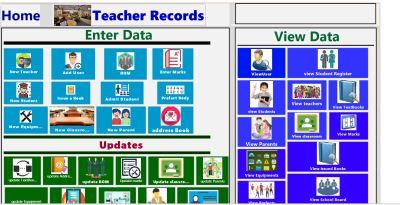
The home page shows the various access points for various parts of the software. It is divided into three sections; one section is a module that have all the forms that can be used to enter data in to the system. The Other module contains all the data forms that are used to update data. Data
update forms uploads the current data and allows the user to edit the information displayed before saving it again. The view Data module enables various reports generated by the system to be seen. The dashboard is designed to be attractive to the user.

Student registration form
This a form where personal details of a student is first entered. It asks for the basic information of the students like three names, birth certificate number and locations. The form is in two sections, one section which is on the left is for general information about the students whereas the right section is for gathering data specific to admission of the student in the school. In the
registration section, teacher’s number for the class in which the student is being admitted should be able to be retrieved. There is a suggestion of creating two forms by separating this form in into separate student registration form and student admission during implementation, but for
now, it will serve its purpose of bringing a conceptual framework for development.

Marks entry form
It shows a form where student marks should be entered. Besides is a table where marks should appear after marks is saved. The table is just a structure and not the real table. When entering marks, the student data should be searched by use of the button on the upper right hand side of
the form. The user enters student’s Admission number on a textbox and then press the search button. The student name should appear on the textbox labelled “Student name:”

Some results
The following paragraphs below and photos shows some transactional process of my project.
The student marks can be entered after he/she is registered from the marks entry form; Student is first searched from the student table and the details added to the marksheet by clicking the update button. The marks are entered such that whatever the marks, CAT1 is evaluated to 20% of the
total evaluation in a term, Midterm is evaluated to 20% and end term is evaluated to 60%.

After save button is placed, the student exam data is placed on a database table as shown calculating some important statistic like mean

If you would like the whole project, send your contact details on the remarks column.