
Tag: web page

  • Creating a web page

    Creating a web page

    In order to write web pages , you will need to understand the HyperText Markup Language(HTML).

    HTML is usually not considered as a programming language but rather a markup language. HTML cannot be compiled by a computer to run as programming language but is interpreted by web browsers like chrome and firefox to display a web page.

    A browser is an application program that provides a way to look at and interact with all the information on the World Wide Web which includes Web pages, links, videos and images.

    HTML uses structural marker called tags which are used by the web browser to determine how a web page is going to appear on a computer screen.

    HTML includes markups that describes the kind of formatting needed to render a web page so that it can be viewable on a computer, tablet, phone or any other screen that acts as a website terminal.

    It determines if the text will be bold, whether data should be presented as tables, what image to accompany the data etc.

    HTML standards has been set so that there is uniform ways of browsers to interpret web pages. The HTML4 was replaced by the current standard which is HTML5. The first standard which was HTML2.0 was developed in 1993. HTML5 supports multimedia that could have only been a dream by then.

    Here we represent a sample web page

    <HTML5>
    <head>
    <title> Hello world!</>
    </head>
    <body>
    <p> Thank you for welcoming me to HTML world!</p>
    </body>
    </html>

    The tag HTML5 indicates that we are using the HTML5 to define components of our page.

    Each HTML element has opening and closing angle brackets. Most of the tages will have closing tag with a forward slash after the first bracket.

    The web page is defined between the starting HTML tag and the ending HTML tag.

    The <head>…….</head> tag defines the header information of the page.

    <head> indicates starting point of the header and </head> shows the end of the head element.

    <title>…..</title> is an element used to display the title of the page.

    The body of the web page is all the elements between <body> and </body> tags. Whatever is between this body tags is what the user that visit the page will see.

    Anything between <p> and </p> is treated as a paragraph in the web page.

    For a user to access a web page, they have to write it’s uniform resource locator (url) on the address bar of the web browser. An address bar will look like as shown when you first open a browser.
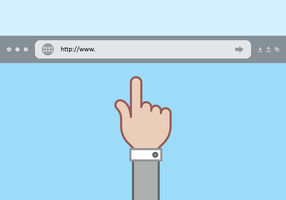
    url is the address of a page the user will use to access it from the internet. The addressing of web pages in the internet uses a standard called http protocol such each page address starts with https://……. and the ” …..” should be replaced by the page address.

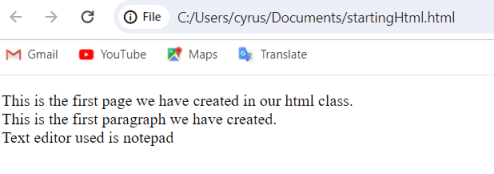
    The web page will not show the tags but only the statements between the <p>..</> tags because they are the only tags between the <body> element. see the diagram below:

    Note that the statement between the title tags is the one showing on the title bar of the browser. The web address is not starting with https but showing the path to the location in my computer because it is fetched from my file system in the OS in my computer disk and not from the internet.

    Related Topics


  • HTML

    HTML

    HTML stands for Hyper Text Markup Language. It is the standard markup language for documents designed to be displayed in a web browser.

    It is the language we use to define the content and structure of the web. A markup language is used to format plain text.

    HTML is used alongside other supporting technologies like CSS and JavaScript.

    In HTML, we will not find language constructs found in programming languages like loops and variable declaration. We simply declare elements to represent structures like text, list, image, paragraphs, links etc, to show how they should be displayed on the web.

    HTML is mostly a static language, we therefore uses JavaScript to do what HTML wont do; adding interactivity in the webpage.

    Tags

    HTML uses tags which are keywords enclosed with brackets <>. This tags usually comes in pairs

    HTML tags are usually in pairs for example <p></p> is used to represent opening and closing of a paragraph.

    common tags in HTML includes:

    <!DOCTYPE>

    It indicates the particular version of HTML being used in the document. It helps the web browser understand the version of the HTML used in the document.

    for example <!DOCTYPE HTML PUBLIC “HTML 4.01”> indicates that HTML 4 is being used.

    <!DOCTYPE html> indicates HTML5 is being used.

    <html>

    Used to represent the root of an HTML document that are below the <!DOCTYPE> element.

    It encloses the complete HTML document and mainly comprises of document header and body. You should include the lang attribute inside the <html> tag as in <html lang=”en”> to declare the language used on the web page which is a useful attribute to search engines and browsers.

    <head>

    Contains meta information about the HTML page. The tag holds HTML tags like <title></title> and <links></links>

    <title>

    Specifies a title for the HTML page which generally appears in the title bar of the web browser.

    <body>

    defines the document ‘s body indicates a container for for all visible contents such as paragraphs and images.

    <!– – – >

    It is a comment meaning it contains information that is only visible to programmer but which will not be rendered into the webpage. It allows a web author provides notes and explain what they are doing.

    <Heading Tags>

    They are the start point for a document. They have different sizes, about six levels with highest being <h1> and the lowest <h6>

    h1 means heading 1.

    browser usually add one line before and after heading.

    Paragraph Tag <p>

    It offers a way to structure your text into different paragraphs where each paragraph goes between <p> and </p>.

    line break

    It creates a new line with an element <br /> causing anything after it start on a new line. It does not need opening or closing tags as there is nothing in between it. Please not that there is a space between br and the slash / which when omitted creates problems with the older browsers when rendering the line break.

    Horizontal line <hr>

    They are used to visually break-up sections of a document where <hr> tag creates a line from the current position in the document to the right margin and breaks the line accordingly.

    Writing your first web page

    You only need a simple editor to write a web page.

    Examples of text editors includes:

    • Notepad
    • komodo Edit
    • sublime Text
    • Notepad++
    • Atom
    • Brackets
    • TextEdit
    • Bluefish
    • BBEdit
    • vim
    • JEdit
    • Emacs
    • Text Wrangler among others

    Let us use a simple notepad that is common in most of windows computer.

    go to your startup menu and type, notepad

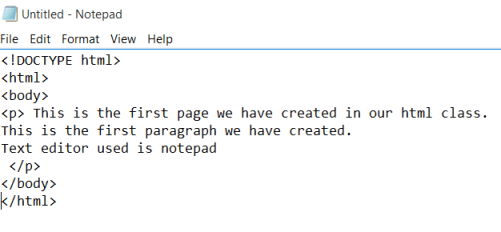
    Type the sentences between the tags as shown. Note that the last tag to use is the first one to close.

    Save the file with name startingHtml.html as shown

    the title bar changes from “untitled” into the name we have given it.

    locate the file, right click it and open with your favorite browser.

    You should see your page rendered on your browser as shown

    congratulations! You have created your first web page

    Related topics