
What is python
Python is a high level, interpreted and object-oriented programming language with wide variety of applications in software development.Python is a general purpose language.
Python was invented in 1989 by a Netherlands Citizen called Guid van Rossum who was a computer scientist. Today is one of the top programming language in the world. The current version in python is 3.12.1.
If you are beginning on python, the recommended python to use is python 3. If you have python 2 already installed, it is advisable to upgrade because or the future development are using python3 and python2 is no longer supported.
In high level programming language, a programmer types commands and put them in a text file known as a source code. It is this source code that will be given to computer system so that it can be interpreted by the computer for execution.
what is an interpreted language
It is a language whose source code need to be translated into language machine can understand using an interpreter each time the code need to be run.
Each system where interpreted language has to be run need to have to have interpreter for the language. To run python programs, you will need python interpreter.
The interpreter reads the source code from top to bottom and from left to right and if no error is found, it interpret the code line by line otherwise it halts execution.
In interpreted language,code is stored in programming language as opposed to machine language.
why python?
- It is supported by all kind of devices, mobile, windows, Linux etc
- Numerous opportunities for code reuse and learning from well -crafted examples
- large and active community that can offer any support you want
- easy to learn
- easy to get resources to code
- Python programming resources are usually obtained free of charge
- easy to set up programming environment and start off
- most of modern software supports python
- uses simple and familiar syntax like those found in C
- good in developing games e.g Frets On Fire game
- you can get guidance from lot of websites
- Python is a great choice for web and Internet development
- It is used for Scientific and numeric computing
- It can be used to develop business applications
- There are so many existing applications already written in python. They need people to maintain.
common application areas for python
- Search engines
- cloud storage
- social media
- data science
- Artificial intelligence
- machine learning
- mobile applications
How to install python on windows
Linux users mostly have python installed in their systems already.
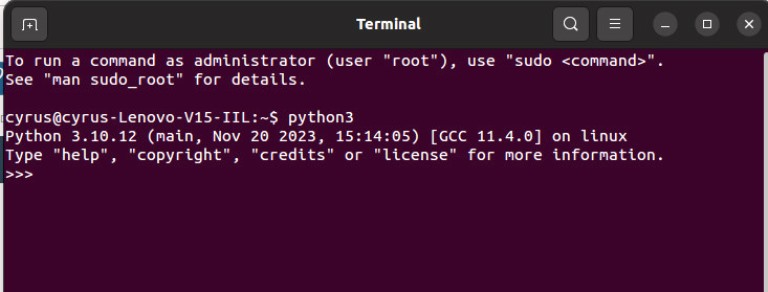
To check whether python is in your Linux system, open the terminal and type python3

If python3 is already on your Linux, you should see the following screen. Here it shows my linux is installed with python3 version3.10.12
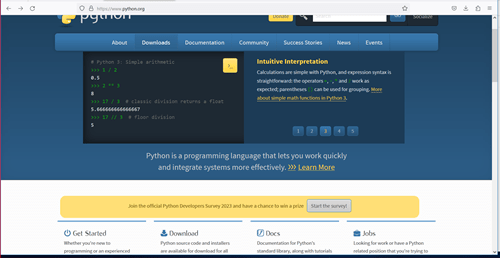
- Visit the python.org website and download your desired version. I recommend the latest. You should see the screen shown.
- Select the Download tab

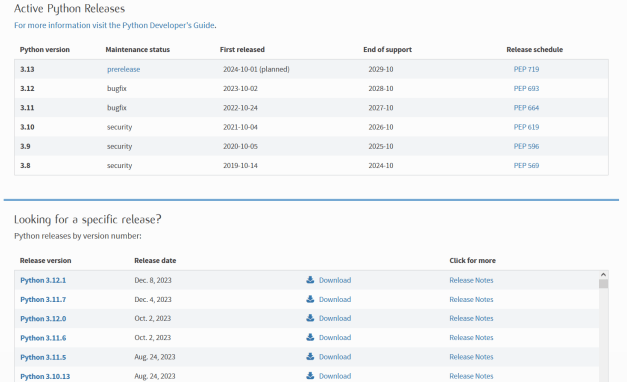
After selecting the desired version is now downloaded in your windows computer. click on it and run run the .exe file as shown. Unless otherwise, be careful to select the check box to allow admin privileges and to add python.exe to PATH

- place your cursor on the “Install Now” and click. You will see a progress bar screen as shown.
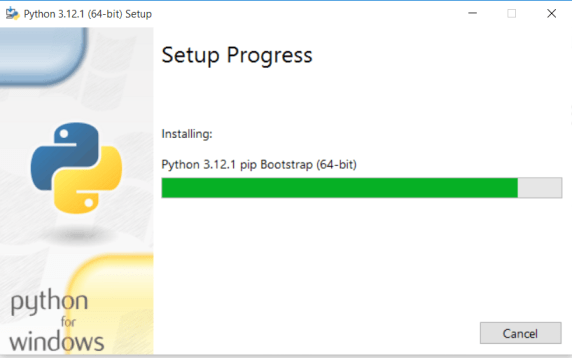
When python is installed, the cancel button will change to close button. Then you will have successfully installed python in your windows computer!
Starting a python program
If you installed python program using steps described above, you have an IDLE (Integrated Development and Learning Environment.
An IDLE should have the following tools:
An Editor
it is a space where you type the codes in high language styles
it allows you develop simple texts
it may allow text features like auto-typing and coloring some words to guide you as a programmer. For example, when the name used is a key word, it is highlighted with a different color. Similarly, variables and functions definitions could have different colors. These features differs from one IDLE to another.
console
It is the tools where your written code are launched. Has features to run your code and check for errors
Debugger
Allows you to inspect the code step by step in order to identify programming errors and single out issues
to startup python IDLE:
- go to startup menu
- All programs
- look for the folder with python3. if you have more than one version of python in your computer, it will be shown as below
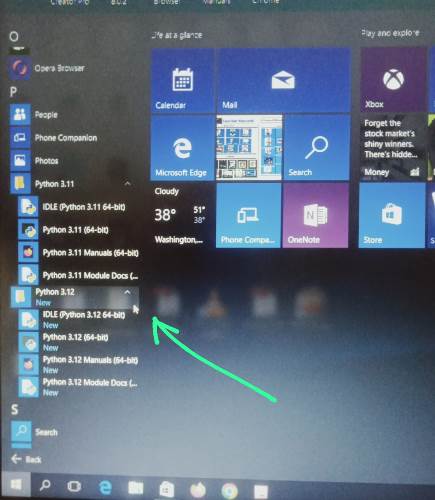
- click the IDLE(python 3.xx 64-bit) to launch it. You may choose to open python command console by clicking the second icon in the folder hierarchy. But in this lesson, we will use the first one.
- After clicking the first icon, a window with a blank file is launched as shown

- Go to files and select save. Name the file and choose folder. You may use to choose the default folder, like mine here is python312. see the illustrations below
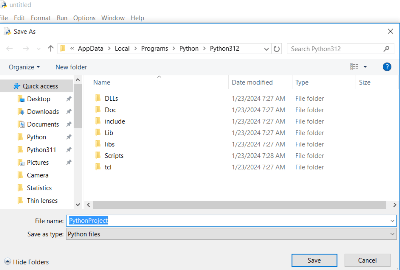
please note that, python will add file extensions by itself so you DON’T need to do that.
After saving your file, you are now ready to start your coding in python!
Our Hello World
In the new file, we type; print(“Hello world!”)

On the menu bar, select and click Run button,Then Run module button. If prompted to save your work first, click okay. If everything goes well you will see a screen below.
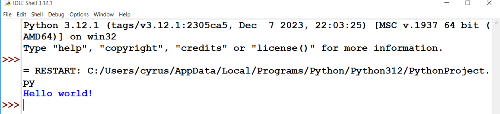
Congratulations! You have just run your first python program.
Related Topics
- Installing_git on_windows
- Basic Git Configuration
- Getting started with Git
- Version control
- Managing historical files
- Python Reserved words
- Introduction to html
- Creating a web page
- Getting started with python
- Artificial Intelligence Vocabulary
- sets