An eclipse occurs when one celestial body moves into the shadow of another celestial body. There are two main types of eclipses that people commonly observe from Earth:
solar eclipses
lunar eclipses.
Solar Eclipse
This happens when the Moon passes between the Earth and the Sun, blocking all or part of the Sun’s light. There are three types of solar eclipses: total, partial, and annular. During a total solar eclipse, the Moon completely covers the Sun, turning day into darkness for a brief period of time. A partial solar eclipse occurs when only a part of the Sun is obscured by the Moon. An annular solar eclipse happens when the Moon is too far away from the Earth to completely cover the Sun, leaving a ring of sunlight visible around the edges of the Moon.
Lunar Eclipse
This occurs when the Earth passes between the Sun and the Moon, causing the Earth’s shadow to fall on the Moon. Like solar eclipses, lunar eclipses also come in three varieties: total, partial, and penumbra. During a total lunar eclipse, the Earth’s shadow completely covers the Moon, giving it a reddish hue, often referred to as a “blood moon.” In a partial lunar eclipse, only a part of the Moon passes through the Earth’s shadow. A penumbra lunar eclipse happens when the Moon passes through the faint outer part of the Earth’s shadow, causing a subtle dimming of the Moon’s brightness.
Eclipses have fascinated people for centuries and have often been associated with myths, legends, and superstitions. They also provide valuable opportunities for scientific study, allowing researchers to learn more about the movements and interactions of celestial bodies in our solar system.
In the modern world, we have a lot of information at our fingertips and so research skills are more important than ever because our challenge is not accessing information but discerning what information is credible and relevant.
Finding Supporting Material
You must be familiar with what you want to talk about if you are to deliver a meaningful speech. studying the existing knowledge forms the first step of your research process. The amount of research and background studies depends on your level of familiarity with the topic you need to talk about.
Background research is just a review of summaries available for your topic that helps refresh or create your knowledge about the subject.
If you’ve thought of a topic to do your speech on, chances are that someone else has thought of it, too, and people have written and published about it and so consulting libraries can be very useful.
College and university libraries are often at the cutting edge of information retrieval for academic research.
Types of information sources
Different types of sources that may be relevant for your speech topic includes:
Periodicals:-include magazines and journals which are published periodically. If your searching for online periodicals, the results can be overwhelming and so you may need to may limit your search to results that have your keyword in the abstract which is the author-supplied summary of the source.
Newspapers and Books:-Newspapers are good for topics that are developing quickly, as they are updated daily. smaller local papers can also be credible and relevant if your speech topic doesn’t have national or international reach. Books are good for a variety of subjects and are useful for in-depth research that you can’t get as regularly from newspapers or magazines.
Reference Tools:- Dictionaries are handy tools when we aren’t familiar with a particular word. Citing a dictionary doesn’t show deep research skills. Reference sources like encyclopedias are excellent resources to get you informed about the basics of a topic and many of them are Internet based, which makes them convenient but they are still not primary sources.
Interviews:- When conducting an interview for a speech, you should access a person who has expertise in or direct experience with your speech topic. Previous employers, internship supervisors, teachers, community leaders, or even relatives may be appropriate interviewees, given your topic. After identifying a good interviewee, you will want to begin researching and preparing questions to ask them.
Websites:- some information may be better retrieved from websites.If you know there is an organization related to your topic, you may want to see if they have an official website. It is almost always better to get information from an official website because it is likely to be considered a primary source information.
Supporting Material
There are several types of supporting material that you can pull from the sources you find during the research process to add to your speech. These materials includes:
examples
explanations
statistics
analogies
testimony
visual aids
Examples
This is a cited case that is representative of a larger whole.
Examples are especially beneficial when presenting information that an audience may not be familiar with. They are also useful for repackaging or reviewing information that has already been presented. Examples can be used in many different ways, so you should let your audience, purpose and thesis, and research materials guide your use. You may pull examples directly from your research materials, making sure to cite the source.
Explanations
They clarify ideas by providing information about what something is, why something is the way it is, or how something works or came to be. One of the most common types of explanation is a definition. Many authors will define concepts as they use them in their writing, which is a good alternative to a dictionary definition. In your speech think about how much your audience knows about a given subject as you do not need to provide definitions when information is common knowledge. It is important to anticipate audience confusion and define legal, medical, or other forms of jargon as well as slang and unfamiliar words words or phrases.
Repeating a definition verbatim from a dictionary often leads to fluency hiccups, because definitions are not written to be read aloud but It is a good idea to put the definition into your own words
Consciously incorporating clear explanations into your speech can help you achieve your speech goals.
Statistics
Statistics are numerical representations of information. As a speaker, you can capitalize on the power of statistics if you use them appropriately. All statistics are contextual, so plucking a number out of a news article or a research study and including it in your speech without taking the time to understand the statistic is unethical.
Although statistics are popular as supporting evidence, they can also be boring especially to people in our audience who are not good at processing numbers. Even people good at numbers may find it difficult to follow a speech full of figures hence it is a good idea to avoid using too many statistics and to use startling examples when you do use them. Rounding off figures instead of giving exact figures and expressing them in format that audience can relate easily like percentage can be useful.
Analogies
involve a comparison of ideas, items, or circumstances like when you compare two things that actually exists. A figurative analogy compares things that are not normally related, often relying on metaphor, simile, or other figurative language devices; for example when we compare a battery that produces current to a pump that pumps water.
To use analogies effectively and ethically, you must choose ideas, items, or circumstances to compare that are similar enough to warrant the analogy.
Testimonies
This is quoted information from people with direct knowledge about a subject or situation.
Expert testimony is from people who are credentialed or recognized experts in a given subject.
Lay testimony is often a recounting of a person’s experiences, which is more subjective.
In courtrooms, Lawyers know that juries want to hear testimony from experts, eyewitnesses, and friends and family.
Visual Aids
This are things that help a speaker reinforce speech content visually helping amplify the speaker’s message.
skillfully incorporating visual aids into a speech has many potential benefits:
Helping your audience remember more information
Helping your audience understand information because it is made more digestible through diagrams, charts etc.
Helping your audience see something in action by demonstrating with an object, showing a video etc.
Engaging your audience by making your delivery more dynamic through demonstration, gesturing etc.
The visual aids you can use in a speech includes:
chalkboards
whiteboards and flip charts
posters and handouts
pictures
diagrams
charts
graphs
videos
presentation software.
Reference: A Primer on Communication Studies, lardbucket.
Note-taking is the practice of writing down or otherwise recording key points of information and is useful exercise when doing research or gathering information. e.g trying to understand what the speaker is saying in a lecture hall.
Benefits of note taking
Actively taking notes during class can help you focus and better understand main concepts and keeps your mind from wandering from the speaker.
crucial for reviewing and studying class material so that you better understand it and can be handy when preparing reports or acts as a guide when preparing for an examination.
enables you to pay closer attention to and become more familiar with the new information.
One of the reasons why we listen is to acquire information. Research has shown that we can lose up to 80% of the content is forgotten within two weeks if no effort is made to record or to remember the material. This stresses the importance of note-taking during a listening session.
Remember, however, not to make a copy of the speaker’s material because:
It is not possible – You cannot match the speaker’s speed.
It is not necessary – Record only what will enable you to recall everything of significance the speaker says.
Note taking helps you to remember both what you heard and what you understood. It is learning about the subject and not simply recording all that the speaker says. By taking notes you are able to pay closer attention to and become more familiar with the new information.
GUIDELINES TO NOTE-TAKING
Date the page
Record any other pertinent information you might need like ,Speaker’s name, Title of the lecture/speech, Venue, time, etc.
Use symbols-they help you to represent many words by a single symbol as the talking speed of the speaker is often faster than our writing speed. With symbols, you can capture a group of letters or words at onces
Use Abbreviations-short form of the words instead of typing the whole word. e.g info. instead of information. note the dot at end of the shorted word info. to signify that the word is a short form of another word.
Use acronyms -This are names formed from the first letters or syllables of other words, for example International Livestock Research Institute is written as ILRI.
Use the form that will help you to review your notes easily. You will need to consider the nature of the content. A note format for Mathematics will not be the same as that one for History, Biology, etc. Biology, for example may call for diagrams; Geography for maps, charts, graphs, etc.
Think of how the presenter has ordered the material. A good lecture or speech has three distinct parts: the introduction, the body, and the conclusion. Listen to the main points for discussion, which are usually given in the introduction. The body then develops them while the conclusion (among other functions) sums them up and points forward to the next step.
Use Letter and Numeral Format efficiently to arrange main points
Clustering/Mind Maps e.g
use Flow Charts especially when a process to do something is being explained.
WHEN NOT TO TAKE NOTES
When the speaker tells you not to write.
When the speaker hands out an outline, notes, or other material and then reads directly from the handout. In this case you can annotate the handout for any extra details.
When it is very clear that what is being said is out of topic. For example, a poor presenter may bring in unrelated issues especially if there is no clear plan or organisation. At other times the speaker may notice lack of concentration among some listeners. He/she then cracks a joke to re-establish the listening mood.
A mixture is obtained by putting together two or more substances such that they do not react with one another.
Density of a mixture lies between the densities of the constituent substances and depends on their proportions.
Volume of the mixture is obtained by summing up the masses of the individual constituents that makes the mixture and dividing it with the sum of their individual volumes. I.e
Density of the mixture=mass of the mixture /volume of the mixture
Listening is the active process of receiving audio message, constructing meaning from it and responding to both verbal and non-verbal communications.
Definitions
Oxford dictionary defines listening as paying attention to somebody or something that you can hear.
Listening is the interpretative action taken by someone in order to understand and potentially make meaningful response to the message heard. (Roland Bathes)
Listening is the active process of receiving audio stimuli (De Vito, 1987).
Definition: Listening is a voluntary process that goes beyond simply reacting to sounds but includes understanding, analysing, evaluating and responding to audio messages.
Listening is an active deliberate, selective process by which a message is received, critically interpreted and acted upon by a purposeful listener.
There is always a big difference between hearing and listening. We should never mistaken between the two. It is possible to hear without listening but you cannot listen without hearing.
Oxford dictionary describes hearing as being ware of the sounds with your ears.
In hearing you may not be analysing or evaluating anything about what you are hearing. It is possible for your ears to be detecting sound without understanding or you responding to it.
Unlike listening, hearing is a passive automatic process of simply perceiving sounds.
Listening involves both verbal and non-verbal communication. Listening involves both verbal and non-verbal communications in that response to presented messages is influenced by a factors like presenters gestures, body movements, eye contacts , dress code,cultural background, venue, expectation of listeners and other physical phenomenons.
Bathe in his paper ‘Listening’ says that hearing is a physiological phenomenon; hearing is a psychological act.
Whereas hearing can be involuntary, listening must be deliberate and it is difficult for it to happen without us putting effort to listen.
Difference between hearing and listening
hearing happens automatically where listening requires our effort
hearing can happen subconsciously, but listening requires decision to do it.
hearing is a physical function of the body but listening is an action we must choose to do
Hearing needs our ears only, listening needs both ears and our mind.
Every good conversation starts with good listening and poor listening can cost us important things in life like jobs, customers in business, relationships etc.
A doctor who does not listen can cause loss of lives. Imagine a plane operator who does not listen communications with the pilot. poor listening can be costly and even bring disastrous results
Effective listening takes time and effort and sometimes may require training of mind. It costs time and energy to listen but profits of listening are worthy the efforts.
Listening is very important in professional world, a judge need to listen carefully to both the prosecution team and the defense team in a law court if he has to make sound judgement. Similarly, a lawyer must listen to his/her clients carefully if he/she will represent their case effectively. students must listen to a teacher carefully if they have to benefit from a lecture. A customer care who does not listen to customers will cause future loss of business to the company.
Active listening is a hard work because it requires concentration on the speaker’s communication yet our minds have tendency of wondering as it is easily distracted by physical or imaginary things . We must practice a discipline in listening but our natural inclination does not favor listening most of the time.
Effective Listening will involves consciously dealing with things that are external or internal to us that interferes with our understanding of audio messages. For example if you have an issue disturbing you in personal life, you may find yourself thinking about it most of the time amidst a lecture and so you find yourself missing out on most of what is spoken.
Levels of listening
Listening is more than just a simple activity and happens in varying levels of concentration that are determine by factors like:
purpose of listening e.g whether to understand a thing or just an entertainment.
physical state
psychological state
physiological state e.g hungry person may not listen effectively
your background knowledge on what is being spoken
content of what is spoken etc.
stages of Listening
According to Joseph De Vito, listening occurs in five stages that includes receiving, understanding, remembering, evaluating and responding.
1. Receiving
Also called sensing. It is the intentional on hearing a speaker’s message by filtering out other sources of communication so that we isolate the message from the speaker and avoid distractive stimuli from other sources. This is a stage we only hear what is being spoken.
You must hear the message as the first step towards other stages of listening.
2. Understanding
This is a stage where we attempts to learn the meaning a message we have heard.If a speaker does not enunciate the message clearly, it becomes understand the message.
Our brain is the main tool needed to help us understand the message . Our cultural backgrounds and personal experiences influences the kind of meaning to the words we hear so that the way understand is influenced by our own perception and experiences. When listening, we should be on the look out for areas of communication where our perception may differ from those intended by the speaker.
3. Remembering
Remembering is being able to bring back to mind what you have heard some few minutes after hearing it. Remembering is committing to memory what you have heard and it is an indication of listening. If you cannot remember what you heard,then your listening is not effective.
The most common reason for not remembering a spoken message is because it was not really learned in the first place(Wolvin & Coakley,1996. Distractions during listening reduces greatly our ability to remember.
4. Evaluating
This involves making some judgement about the message heard to determine whether it is valuable to us, it is making sense or whether is wrong. Evaluation of the same message can vary widely from one person to another because of our perception, culture and experiences.The communication skills of the speaker will have a great role on how listeners will evaluate the message.One should avoid making skewed judgement on a message beacuse of personal prejudice on the speaker.
5. Feedback
It is when a listener indicates his/her involvement by reacting in a manner that can be detected by the speaker. For example students in class gives feedback to the teacher by making notes. Another feedback is when listeners looks for clarification by asking questions on what was said.
Consider a cylindrical solid of cross-section area A which is totally immersed in a fluid of density ρ as shown.
The pressure due to liquid column is usually given by P=ρgh.
Pressure at the top of the solid will be given by, PT = h1ρg.
Where h1 is the height of the liquid column above the top of the object.
Pressure at the lower end of the object will be given by
Pb=h2ρg where h2 is the height of the liquid above the lover surface of the cylinder .
The pressure at the top of the cylinder will provide downward force exerted by the liquid up on the object.
From the pressure laws, F=pressure P x Area A.
i.e F=PA.
Taking the area of the cylinder at the top, the force from the liquid acting on that surface is Given by F=PT x A=h1ρgA.
Similarly, pressure at the bottom is given as F=PB x A=h2ρgA.
The total resultant upwardward force F is this given as
F=F2-F1
Hence F=h2ρgA-h1ρgA
Factoring out the common factors: F=ρgA (h2-h1)
Let h be the difference between liquid column on top and the one at bottom h2 such that h=h2-h1
Hence F=ρgAh
But Volume is always given by V=Ah
The resultant force F is the upthrust force U and will thus be expressed as.
F=U=Aρpg=pgV
where V is the volume of the liquid displaced.
Mass of the liquid is usually given by density x volume. Hence mass m of liquid displaced will be given by m=Ahρ
Weight is usually given as Weight W=mg
Hence weight of liquid displaced will be W=U=Ahρg which represents the upthrust force we calculated earlier. This confirms the archimedes principle that upthrust force is equal to the weight of the fluid it displaces.
From our mathematical arguments, it should be easy to see that Magnitude of the upthrust force is equal a function of volume of the object and density of the liquid considering that gravitational pull g is a constant.
In order to write web pages , you will need to understand the HyperText Markup Language(HTML).
HTML is usually not considered as a programming language but rather a markup language. HTML cannot be compiled by a computer to run as programming language but is interpreted by web browsers like chrome and firefox to display a web page.
A browser is an application program that provides a way to look at and interact with all the information on the World Wide Web which includes Web pages, links, videos and images.
HTML uses structural marker called tags which are used by the web browser to determine how a web page is going to appear on a computer screen.
HTML includes markups that describes the kind of formatting needed to render a web page so that it can be viewable on a computer, tablet, phone or any other screen that acts as a website terminal.
It determines if the text will be bold, whether data should be presented as tables, what image to accompany the data etc.
HTML standards has been set so that there is uniform ways of browsers to interpret web pages. The HTML4 was replaced by the current standard which is HTML5. The first standard which was HTML2.0 was developed in 1993. HTML5 supports multimedia that could have only been a dream by then.
Here we represent a sample web page
<HTML5>
<head>
<title> Hello world!</>
</head>
<body>
<p> Thank you for welcoming me to HTML world!</p>
</body>
</html>
The tag HTML5 indicates that we are using the HTML5 to define components of our page.
Each HTML element has opening and closing angle brackets. Most of the tages will have closing tag with a forward slash after the first bracket.
The web page is defined between the starting HTML tag and the ending HTML tag.
The <head>…….</head> tag defines the header information of the page.
<head> indicates starting point of the header and </head> shows the end of the head element.
<title>…..</title> is an element used to display the title of the page.
The body of the web page is all the elements between <body> and </body> tags. Whatever is between this body tags is what the user that visit the page will see.
Anything between <p> and </p> is treated as a paragraph in the web page.
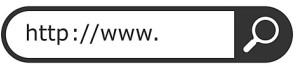
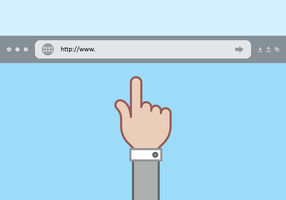
For a user to access a web page, they have to write it’s uniform resource locator (url) on the address bar of the web browser. An address bar will look like as shown when you first open a browser.
url is the address of a page the user will use to access it from the internet. The addressing of web pages in the internet uses a standard called http protocol such each page address starts with https://……. and the ” …..” should be replaced by the page address.
The web page will not show the tags but only the statements between the <p>..</> tags because they are the only tags between the <body> element. see the diagram below:
Note that the statement between the title tags is the one showing on the title bar of the browser. The web address is not starting with https but showing the path to the location in my computer because it is fetched from my file system in the OS in my computer disk and not from the internet.
before we start working with Github, that is, to start committing, pushing files or cloning, we need to tell git about ourselves. Git need to know who we are. We do that by use of git config command and then setting values for our email and user name. Assuming you have already installed Git into your windows machine, go to windows menu and look for ‘Git Bash’ from main menu and click it’s icon as shown.
Your Git command line should be like below when you first open it.
git config command
we then type the two Git config command to set email and password:
You should replace the email in double quotes with the email you used to register for github and replace “YourGutHubUserName” with your github username.
the –global is the flag used to show that the value we have set should be used for all our github repositories.
If we wish, we may set different values for different repositories.
After setting our identities with github, we will need a git repository to start working with. We can have at least two ways to do that:
Use git init to start one from scratch or
use git clone to setup a repository we have already created in our local machine or somewhere else
creating a directory
In this lesson, we are creating our repository from scratch. Let us create a directory which we will be using in this course. we will use a ‘mkdir’ command followed by the name of the directory.
we have then used the command ‘cd’ and then the name of the directory to move to the new created directory so as to have the following window
git init command
running ‘git init’ command initializes empty repository in the current directory. A message is returned mentioning a directory called .git.
to confirm that we have created the directory, we use the ls -la command that causes the files created with the directory to be listed.
ls -l .git/
we can also use the ‘ls -l .git/’ command to see the many things our directory contains as shown:
git directory can be thought of as a database in your git directory that stores changes and change history of your project. Anytime you clone a directory, the directory is copied into your computer.
Every time you run a git init, a new directory is intialized.
Area outside git directory is the working tree. Working tree is the conversion of your project. It can be thought of as a work bench or sandbox where you perform all the modifications you want on your file. This working tree will contain all the files being tracked by the git and any new file we have not yet added to list branch file.
Our tree file is empty, and so we need to put some file in it. we copy a certain file from my computer by opening it’s location and then copying its address bar as shown.
copying a file to the new directory
please note that the backward slashes(\) in the file path must be changed manually each to forward slashes (/) for the copying to be successful, otherwise you will get an error.
we have now copied our file to the new current directory. Note the . at the end of the path statement.
ls -l command
The above statement after ‘ls -l’ command shows we have just copied the file to the directory.
We have now our file in the working tree but it is not being tracked by Git.
To make the git start tracking the file we add it to the project using ‘git add’ command passing the file as a parameter.
Now we have added our file to the staging area
Staging area
A staging area also known as the index is a file maintained by Git that contains all of the information about about what files and changes are going to go into your next commit.
git status command
we can use ‘git status’ command to get some information about the current tree and the impending changes.
our new file is labelled “to be committed”. This indicates that changes we have made to the file are currently in the staging area.
git commit command
To make our file to be committed, we run ‘git commit’ command.
The above command will prompt opening of our default editor where we should type a commit message(comment) and then save the opened file before closing it. The bash window above shows the words “waiting for your editor to close the file” as it has paused commit execution process in order to allow you edit the file commit message.
Note that in our lessons on installing Git, we choose vsCode as the default editor, and so it has opened.
After we commit successfully, we get the following message.
We have now successfully made a git commit. You may want to type ‘git status’ to see the current tree status.
The word phase in normal usage means any stage in a series of events or in a process of development.
cambridge University dictionary defines phase as one of the stages or points in a repeating process measured from a specific starting point.
Two Waves can be of the same amplitude but with the different frequencies as shown in figure below.
The wave profile P makes it’s one complete oscillations before wave Q. Wave P has shorter wavelength compared to Q and hence P has higher frequency.
We can also see that P has smaller period as waves with shorter wavelength has smaller period.
Wave P completes it’s first cycle at A while Q finishes it’s first oscillation at B. We can say that P is leading Q. The maximum displacement of the two waves is the same hence they are operating at the same amplitude but different frequency. The two waves are said to be out of phase.Think about two radio receivers tuned to two different stations but with equal volume.
waves can also be of the same frequency but different amplitudes. Think of when we tune in our two radio receivers to the same station and then set them at different volumes
The figure below illustrates two waves operating at same frequency but at different amplitudes.
As can be seen from the diagram, one wave is having more displacement than the other one but they are arriving at the same horizontal position simultaneously. We say they are in phase.
Pendulum bobs in phase
To further illustrate the concept of phase and out of phase oscillations, consider two identical pendulums with bobs P and Q below.
The two masses, P and Q are set in oscillation by giving them some displacement on the left and then releasing them simultaneously. Because they have equal displacement and released at the same time , they will pass through the lowest point Y at the same time as they move on to the opposite direction.. They attain displacement together at Z and swing back together to complete the oscillation at x.
At any particular moment, the two masses will be moving in the same direction and at the same level of displacement in their oscillations.The masses are said to be oscillating in phase.
Particles in a wave motion which happens to be oscillating in the same direction and at the same level of displacement in their oscillation are said to be in phase.
The diagram below have highlighted two positions of particles A and B. The particles are in the same displacement level from the reference line and they are both facing the same direction as indicated by the arrows. The particles A and B are said to be in phase and their distance apart is the wavelength λ of the wave motion whereas time taken to move from A to B is the periodic time T.
Particles in a wave motion can be in phase even if they have different amplitude.
In our previous pendulum oscillation of mass P and Q ; If P is Initially given a larger displacement than Q, the two will oscillate i n phase even though P will always be at a larger magnitude of displacement than Q.
A typical displacement time graph for two wave motions in phase with different amplitudes is shown below.
two waves in phase at different amplitude.
Oscillations out of phase
Consider two masses P and Q displaced from opposite directions from each other as in figure below.
When released simultaneously, they pass through the rest position at the same time as they move in the opposite direction and they reach a point of maximum displacement at the same time but their maximum displacement is in opposite direction to each other.
180o out of phase
The two objects above are always at the opposite levels of displacement and their oscillations opposite direction to each other and they are said to be in opposite phase.
Wave motions that have same displacement and makes complete oscillations at the same time with their maximum displacements in exact opposite to each other are said to be in 180o phase difference (180o out of phase).
The figure below shows two wave motions at 180o phase difference.
90o out of phase
suppose in our pendulum oscillations we displaces the objects P and Q to X ; we release Q before P and then we release p when Q is exactly at Y. The angle of oscillation between P and Q will be 90o in difference and the resulting oscillation will be 90o out of phase.
The displacement time graph for waves 90o out of phase is illustrated below.
two waves can be out of phase at any angle. We are likely to see that in our future lessons
Visit https://gitforwindows.org/ and download the latest version of Git software, then press the download button shown.
The software package we download comes with a bunch of tools that can be very hady like Bash emulation environment where we can run all Git commands and a bunch of Unix like utilities. The downloaded package also comes with GUI that we can use to interact with Git.
on clicking the Git-2.44.0-64-bit.exe file, the first window we get is the licence of the software as shown
After scrolling through the licence agreement and being satisfied with tem, click next. The next window is for installation path. If you are an expert user, you may want to change the installation path, but the default path is sufficient for any user.
The next window let us select additional components to add to our Git installation. By default, Git integrates with the window Explorer to let us run Git command line or the Git Graphical interface in the current folder.
The software package comes with an extension for improving the support of how large files like audios or videos get stored in the version control system and it is recommendable to leave it checked.
The installer will register the git configuration files as files that should be opened with a text editor and the .sh files that should be executed with bash.
There is no harm on enabling all other options, but on my side, i like stability, so i have avoided the ‘check daily for Git for windows updates’. We click next.
We get prompted for the name of the folder where we want to create all the shortcuts. Accepting the default name ‘Git ‘ is just fine so we go Next.
Next window will require us choose the code editor. You may want to adjust the default because it may not be the editor you are most comfortable with. Mine has been adjusted to select visual studio code as the default editor.
Other options includes:
sublime Text
visual studio code Insiders
Atom
VsCodium
Notepad
Wordpad
other editors
‘Other editor’ option means can select any other editor we want to use by entering the path to the editors executable files.
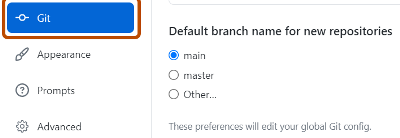
The next window let us choose between accepting Git default branch name or let us use our own customized branch name. We leave the second option for the experts and choose the first one.
The next window let us choose how we want to adjust the path environment.
Choosing the first option will make Git only accessible through the embedded command line that comes with the bundle.
The second option which is the selected one by default, allows us to execute Git from the embedded command line and from the Windows Command prompt and also from PowerShell and other softwares that will be looking for Git in path.
The third option will add the Unix-like tools that comes with Git to the windows Command Prompt. With this option, any commands that have the same name as those in the OS will come from the bundle and not from the basic OS.
We Choose the second option which was also selected by default and go to Next.
The next window let us choose how we want to validate the SSL certificates used for HTTPS connections. You choose the second option if you need to interact with your company’s internal systems.
Here we choose the default one as we will only be interacting with Github.
The next window let us select what we want to do about the line endings. The Git software let us choose how we want to handle characters used to indicate end of the line as they are different in windows, linux and macOS.
The first option works well when you are using your windows computer to collaborate with others using a different OS.
The second option keeps the line endings unchanged when copying the files locally and use Unix endings for the files stored in Git. This would work well if you are using a Unix like OS or if you are only editing through Unix-Like editors on Windows.
The third option is to do no conversion at all though it doesn’t work well if you are trying to work with people using different OS. It is only suitable if everyone is using the same OS.
We select the first one.
The next window let us choose the terminal emulator.
The software bundle comes with it’s own terminal emulator that includes a bunch of nice features like nice Unicode support and a long history of command we can scroll. We choose the first one which is selected by default.
The next window let us choose what happens when we pull a file from the Github repository.
The rest of the windows we should use the selected option by default and move on.
Go next
press Next
Press the install button to install the software
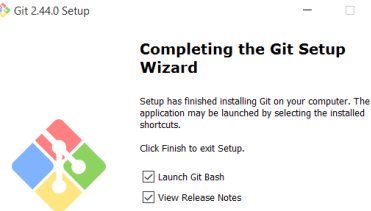
After installation is complete, you can click finish to launch the git.
Clicking launch button should launch the MINGW64 command terminal as show, where you can type git commands.
You may need to check on release notes that is launched together with the commandline window, otherwise you have successfully installed Git in your windows computer
Contains information related to marketing campaigns of the user. These are shared with Google AdWords / Google Ads when the Google Ads and Google Analytics accounts are linked together.
90 days
__utma
ID used to identify users and sessions
2 years after last activity
__utmt
Used to monitor number of Google Analytics server requests
10 minutes
__utmb
Used to distinguish new sessions and visits. This cookie is set when the GA.js javascript library is loaded and there is no existing __utmb cookie. The cookie is updated every time data is sent to the Google Analytics server.
30 minutes after last activity
__utmc
Used only with old Urchin versions of Google Analytics and not with GA.js. Was used to distinguish between new sessions and visits at the end of a session.
End of session (browser)
__utmz
Contains information about the traffic source or campaign that directed user to the website. The cookie is set when the GA.js javascript is loaded and updated when data is sent to the Google Anaytics server
6 months after last activity
__utmv
Contains custom information set by the web developer via the _setCustomVar method in Google Analytics. This cookie is updated every time new data is sent to the Google Analytics server.
2 years after last activity
__utmx
Used to determine whether a user is included in an A / B or Multivariate test.
18 months
_ga
ID used to identify users
2 years
_gali
Used by Google Analytics to determine which links on a page are being clicked
30 seconds
_ga_
ID used to identify users
2 years
_gid
ID used to identify users for 24 hours after last activity
24 hours
_gat
Used to monitor number of Google Analytics server requests when using Google Tag Manager